Connecting Google Hotel Ads and Vacation Rentals
Updated on 2026-10-01
Connecting Google Hotel Ads and Vacation Rentals
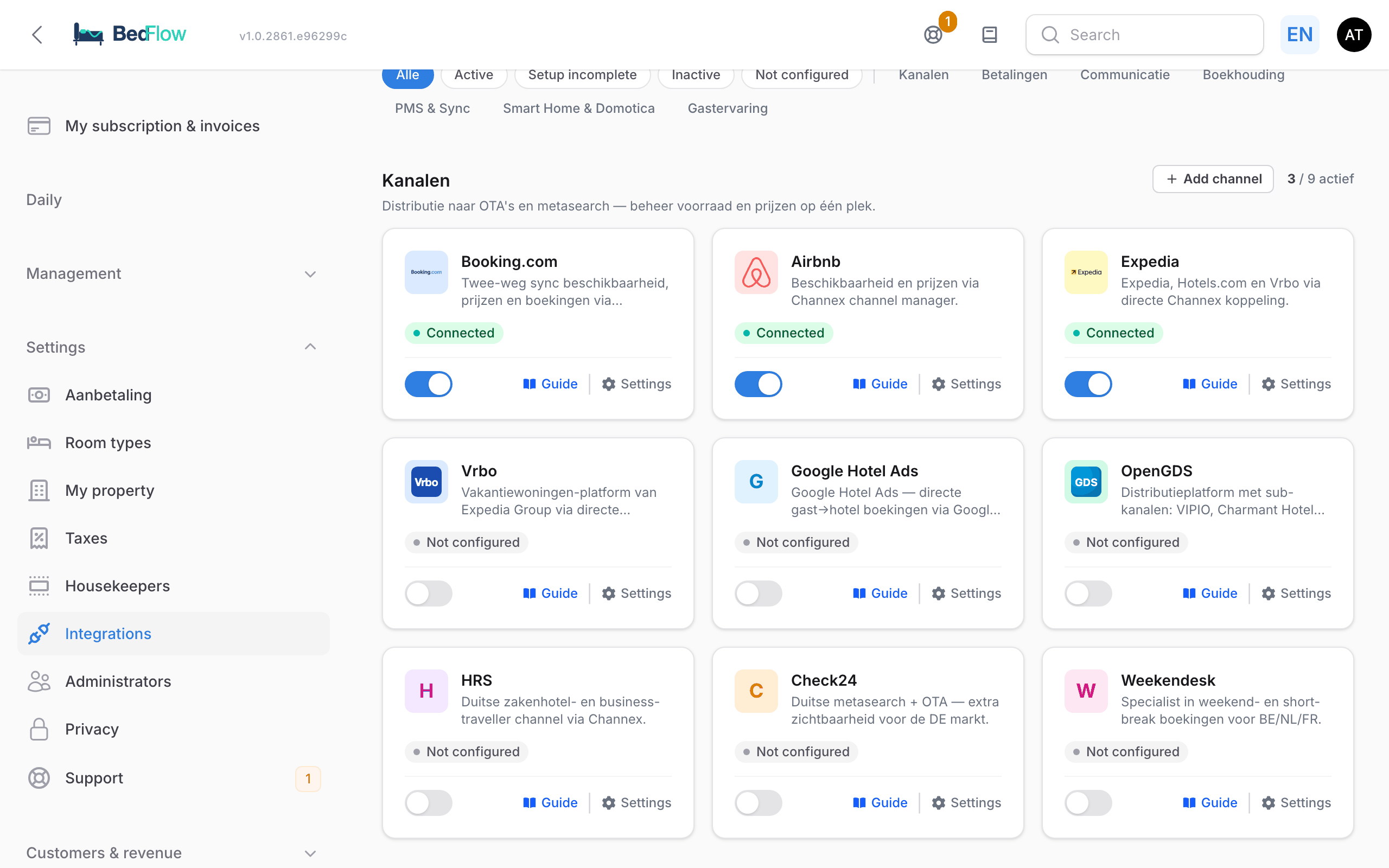
Settings → Integrations → Channels → Google Hotel Ads (or Google Vacation Rentals)
With this connection, Google shows your rates and availability in Google Search, Google Maps and Google Hotels, alongside those of Booking.com and Expedia. Through Google's free booking links you pay no commission.
Google has two variants, and BedFlow picks the right one for you:
| Property type in BedFlow | Tile | Where you appear |
|---|---|---|
| B&B or hotel | Google Hotel Ads | Google Search, Maps and Google Hotels |
| Holiday home | Google Vacation Rentals | Google's holiday rental listings, in Search and Maps |
You set the property type under Settings → My property → General → Type. You only ever see one Google tile, never both.
Which plan do you need?
Google Hotel Ads and Google Vacation Rentals are included in Starter and higher. On Seizoen and Micro, the Google tile shows Not in your plan, with the message "Google Hotel Ads and Vacation Rentals are included from Starter." and an Upgrade button. Booking.com, Airbnb and the other channels can still be connected on those plans. More about the plans in Subscription & billing.
Why Google is worth it
| Feature | Booking.com | Airbnb | Expedia | |
|---|---|---|---|---|
| Standard commission | 18% | 15% | 20% | 0% |
| Divisor in BedFlow | 0.82 | 0.85 | 0.80 | 1.00 |
An example: on a €120 night, Booking.com keeps around €22 in commission. Via Google, that amount stays with you.
Requirements
| Item | Where to find it |
|---|---|
| Starter plan or higher | My subscription & invoices, at the top of the sidebar |
| An active, verified Google Business Profile for your property | business.google.com |
| Your Place ID or Business Profile ID | See step 2 |
| A booking page that is online | Settings → My property → Website & booking page → Guests can book online switched on |
| The same address and phone number in BedFlow as in your Google Business Profile | Settings → My property → Location & contact |
| House rules and cancellation policy | Settings → My property → Content & policies (OTA / Google), see Content & policies |
| At least one room with a base rate | Settings → Room types and Management → Rates |
Google only lists your property once your address exactly matches your Google Business Profile and rates and availability are ready for the coming weeks.
Step 1 — Claim your Google Business Profile
Don't have a Google Business Profile yet?
- Go to business.google.com.
- Add your business.
- Fill in the name of your property, the category ("Bed & breakfast", "Hotel" or a holiday rental category), your address and phone number.
- Verify by postcard, phone or video (this can take a few days).
Already have a Google Business Profile? Go straight to step 2.
Step 2 — Find your Place ID
-
Go to Google's Place ID Finder.
-
Search for the name of your property in the search bar on the map.
-
Click the marker: a box appears with your Place ID — a long code starting with
ChIJ….Example:
ChIJN1t_tDeuEmsRUsoyG83frY4 -
Copy this code.
Step 3 — Enter the ID in BedFlow and connect
- Go to Settings → Integrations and click Settings on the Google tile.
- Paste the code into the Google Business Profile ID field (section Channel connection) and click Save.
- Click Connect in Channex. The Channel connection window opens inside BedFlow, with the channel manager's connection form. Go through the tabs and map your rooms in Mapping. Also check the Readiness Check tab: it shows what Google is still missing.
- Click Done — close and refresh status.
Is Google your first channel? Then BedFlow sets up your property on the channel manager at that moment, with your room types and rates.
For a holiday home, BedFlow connects to Google Vacation Rentals; for a B&B or hotel, to Google Hotel Ads. You don't need to choose this anywhere.
Step 4 — Google approves
Google reviews every new connection. Allow a few working days to a couple of weeks. Among other things, Google checks:
| Check | What you do |
|---|---|
| Your booking page is reachable | Keep Guests can book online switched on under My property |
| Your address matches | The address in BedFlow and in your Google Business Profile must be identical |
| Rates and availability are available | BedFlow sends them automatically; after major changes, click Synchronise channels |
| Your policies are filled in | Description, house rules and cancellation policy in Content & policies (OTA / Google) |
As soon as Google approves, the status switches automatically to Active — your channel is live.
Common reasons for rejection
- The address does not match your Google Business Profile → correct it in BedFlow and wait for a new review.
- Your booking page is switched off → switch on Guests can book online.
- No rates for the coming weeks → go to Settings → Integrations and click Synchronise channels at the top right. That button sends your rates and availability for 365 days ahead.
What happens after activation?
| What happens in BedFlow | Effect on Google |
|---|---|
| Rate changed under Management → Rates | The new rate appears on Google quickly |
| Room blocked on Daily → Availability | No longer bookable via Google |
| Booking via Booking.com, Airbnb or your website | Availability on Google goes down automatically |
| Booking via Google | Arrives in BedFlow, with Google as the channel on the booking |
Who collects the payment? If guests book via Google and you collect payment yourself ("Payment Collect: Property"), switch on Online prepayment required in the Google tile's window. The guest then receives the same payment link and reminders as with a direct booking. See Who collects the payment?.
Frequently asked questions
Are the free booking links really free? Yes. Google earns money from paid advertising (Hotel Ads campaigns that rank you higher), but the free listing costs nothing. Paid campaigns are a separate product and are not required for the free listing.
What is the difference between Hotel Ads and Vacation Rentals? Vacation Rentals is for properties you rent out in their entirety (gîtes, holiday homes). Hotel Ads is for B&Bs and hotels with several rooms. BedFlow chooses based on the property type under My property → General → Type.
My property was already on Google Maps with reviews. Do I still need to do anything? Yes. Your Google Business Profile (reviews, Maps) and the booking listing are two separate things. Only with this connection do your rates and availability appear on Google.
I see "Not in your plan" on the Google tile. You are on Seizoen or Micro. Click Upgrade to see which plan includes Google.
What if my Google Business Profile is suspended? Then your booking listing on Google disappears as well. First resolve the issue with your Business Profile at Google.
Need help?
Email support@bedflow.eu and include the name of your property in BedFlow. Usually the cause is an address that does not match your Google Business Profile.