Rate management — base prices, rate profiles and price calendar
Updated on 2026-10-01
Under Management → Rates you set up everything that determines the price of a night. At the top there are two tabs: Rates (this page, titled "Rate management") and Restrictions (see Restrictions). You need the Rates & availability permission to change anything here.
The page has four blocks, from top to bottom:
- How is the price calculated?
- Base prices per room
- Rate profiles
- Price calendar
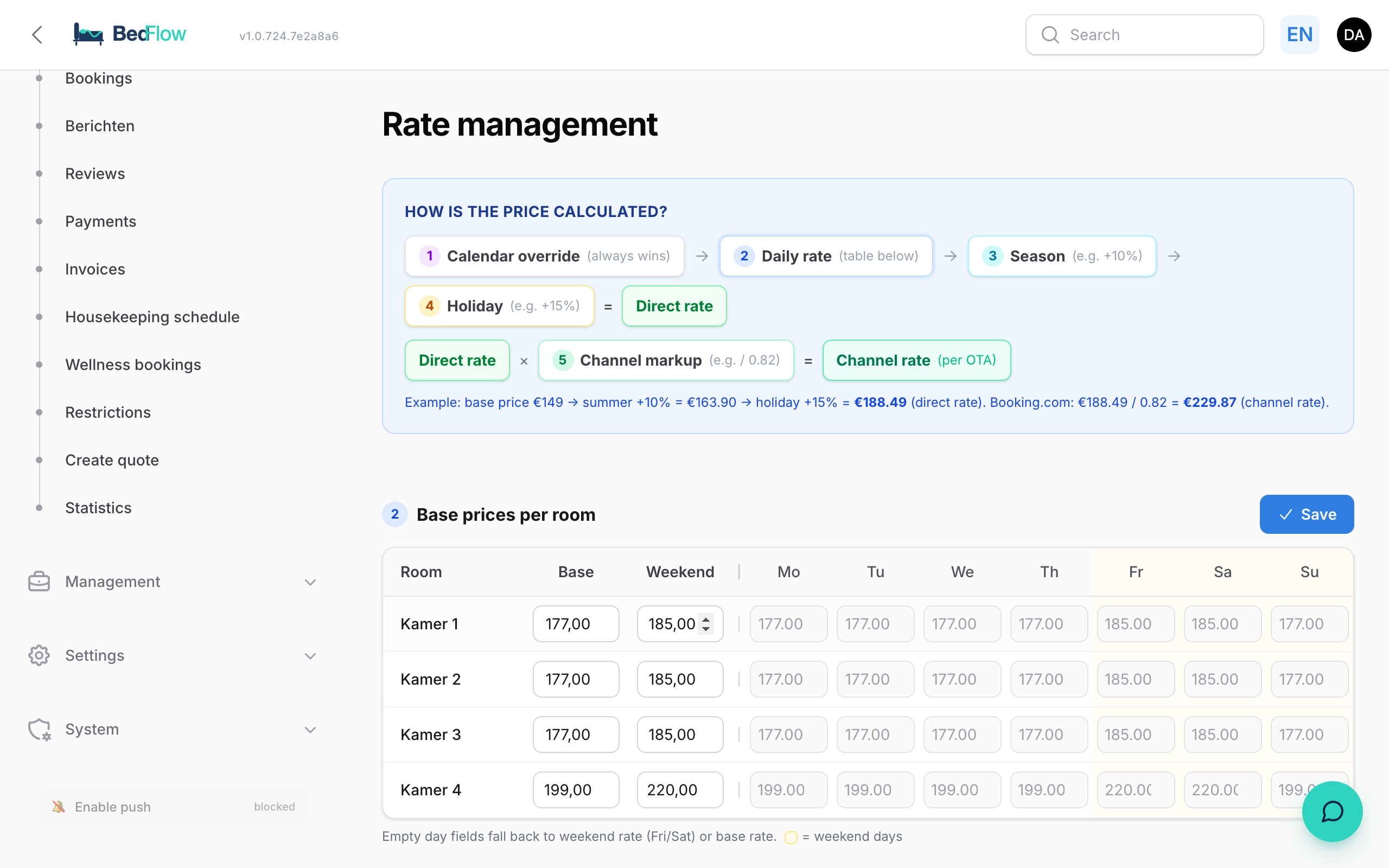
How is the price calculated?
At the top, BedFlow shows the price chain in numbered steps:
| Step | What | Explanation |
|---|---|---|
| 1 | Calendar override | A price you set yourself for one room and one day. It always wins. |
| 2 | Daily rate | The price from the base prices table: a specific daily price, otherwise the weekend price, otherwise the base price. |
| 3 | Season | E.g. +10% in July and August. |
| 4 | Holiday | E.g. +15% on a public holiday. |
| = | Direct rate | The price per night on your own booking site and for a phone booking. |
| 5 | Channel markup | E.g. divided by 0.82 for Booking.com. |
| = | Channel rate | The price the channel receives. |
Example: base price €149 → summer +10% = €163.90 → public holiday +15% = €188.49 (direct rate). For Booking.com: €188.49 / 0.82 = €229.87 (channel rate).
If several season profiles (or several holiday profiles) apply on one day, they all count, in order of their priority.
What else counts per booking
The chain above gives the price of one night. For an actual booking, these are added:
- the occupancy price: a factor per number of adults (see "Price per number of people" below);
- a length-of-stay discount from a certain number of nights (see Length-of-stay discounts);
- on your own booking site, the rate option the guest chooses (see The booking widget).
Base prices per room
A table with one row per room (with the internal name) and the columns Base, Weekend and Mon to Sun.
- Base: the regular price per night for 2 people.
- Weekend: applies on Friday and Saturday.
- Mon … Sun: only fill something in if a weekday has its own price.
An empty day field falls back to the weekend price (Friday and Saturday) or the base price (the other days). In an empty field you see in grey the price that day falls back to. Click Save at the top right; you get the message "Base prices saved" and the new prices go to your connected channels automatically.
You'll also find the same base and weekend price on the Prices tab of the room type (Settings → Room types).
Rate profiles
A rate profile adjusts the price automatically for a period, for public holidays, for a channel or from a certain number of nights.
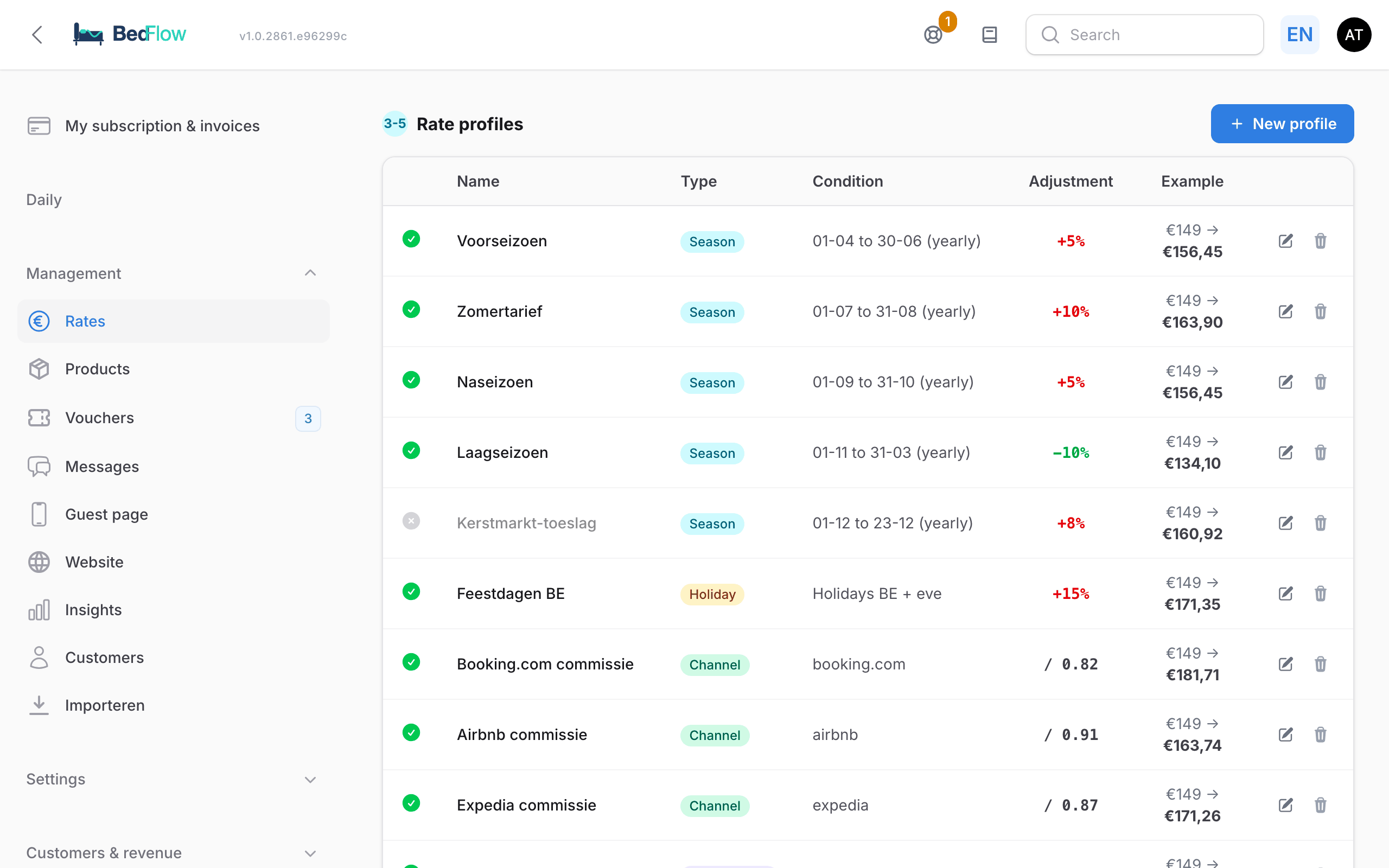
The list shows for each profile:
| Column | What it shows |
|---|---|
| (status) | Green tick = active, grey cross = inactive. Click to switch the profile on or off. |
| Name | The name you gave it. |
| Type | Season, Holiday, Channel or Length of stay. |
| Condition | E.g. "01-07 to 31-08 (yearly)", "Holidays BE, NL + eve" or "from 7 nights". |
| Adjustment | E.g. "+10%", "+€20.00" or "/ 0.82". A surcharge is shown in red, a discount in green. |
| Example | What the profile does to a base price of €149. |
Use the pencil to edit a profile and the bin to delete it (after confirmation).
Creating a profile
- Click New profile.
- Fill in a Name, e.g. "Summer rate".
- Choose the Type (see the table below) and fill in the block that appears.
- Under Adjustment type, choose: Percentage (+15% or -10%), Fixed amount (+€20 or -€10) or Divisor (/ 0.82 for commission).
- Fill in the Value: positive is a surcharge, negative a discount. For a divisor, it's the value the price is divided by, e.g. 0.82.
- Leave Active ticked and click Save.
| Type | What you fill in |
|---|---|
| Season | Start and End. With DD-MM (e.g. 01-07 to 31-08) the season recurs every year; with DD-MM-YYYY it applies once. A period over the turn of the year (15-11 to 15-01) is possible too. |
| Holiday | The countries whose public holidays apply: Belgium, the Netherlands, Germany, France (at least one). BedFlow calculates the public holidays itself every year, including Easter, Ascension Day and Whitsun. Tick Include eve (separate surcharge) if the evening before may also be more expensive; you then choose a separate value for the eve, or the same as on the holiday itself. |
| Channel | Which channels the profile applies to: Booking.com, Airbnb, Expedia, Vrbo, Google Hotel Ads, OpenGDS, HRS, Check24, Weekendesk. The usual commission is shown next to each channel. If you work with sub-channels (e.g. via OpenGDS), you can also give each sub-channel its own margin. |
| Length of stay | Discount from … nights. Everything about this type is in Length-of-stay discounts. |
Under Advanced (limit rooms, priority) you can limit a profile to certain rooms (Only for these rooms (empty = all)) and give it a Priority: a lower number is applied first.
Channel markup: why divide by 0.82?
An OTA deducts commission from the price the guest pays. If you divide your direct rate by 0.82, then after 18% commission you're left with exactly your direct rate: €188.49 / 0.82 = €229.87, and 82% of that is €188.49 again.
When you switch on a channel via Settings → Integrations, BedFlow immediately creates a "{Channel} commission" profile with the usual divisor for that channel. Check the value and adjust it to your own contract. Keep only one active channel profile per channel.
Price calendar
At the bottom you see, for one room, the price BedFlow calculates for each day. Choose the room at the top right and use the arrows to browse through the months; click the month name to return to the current month.
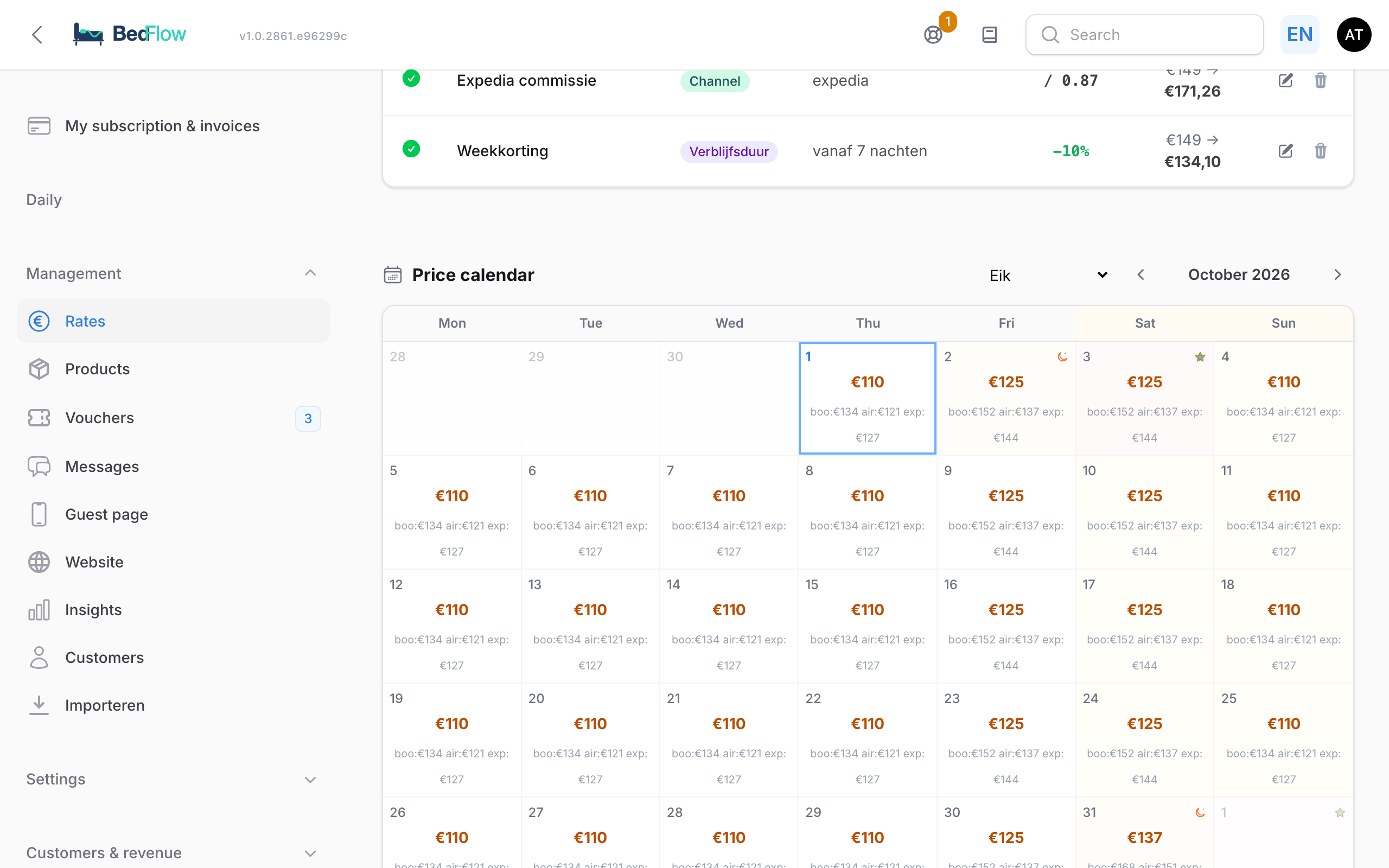
- A purple price is a calendar override, an amber price has a season or holiday surcharge, a black price is the regular daily rate.
- A star marks a public holiday, a crescent moon the eve. Hover to see the name of the holiday.
- The channel rates are shown briefly below the price.
Hover over a day for the full calculation: the daily rate, each profile that counts with its intermediate amount, the Direct rate and the Channel rate per channel.
Setting or removing a price for one day
That hover explanation contains an input field:
- Without an override: enter a price under Override price (€) and click Set.
- With an override: you see the Manual override next to the Automatic calculation and the difference. Enter a new price and click Set override, or click Switch to automatic to remove the override. The day is then calculated according to the chain again.
An override reaches your connected channels within 30 seconds.
Quickly adjusting a price from the room overview
Under Daily → Availability, right-click a free or blocked day for a room and choose Adjust price (current €…). Enter the new price and click Save. That's the same calendar override as above. You can't adjust a booked day this way. Removing an override is only possible in the price calendar on this page.
Price per number of people
The base price is the price for 2 people. If you want one person to pay less or a third person to pay more, you use occupancy prices: a factor per number of adults.
- For the whole property: Settings → My property, section Occupancy prices (modifiers).
- For one room: Settings → Room types → edit the room → Prices tab → Occupancy prices section. These values take precedence over those of the property.
Example: 1 adult = 0.80 (20% cheaper), 2 = 1.00 (the base price), 3 = 1.15, 4 = 1.30. Children don't count for this factor.
On your own booking site, for phone bookings and in quotes, only what you fill in yourself applies. If you fill in nothing, every occupancy pays the base price.
On the channels (Booking.com, Airbnb, …) BedFlow also uses your own values. If you fill in nothing, BedFlow sends a default: 1 person 0.80, 2 people 1.00 and 0.15 more per extra adult. For a self-contained holiday home, apartment or studio that default is flat: the same price for every occupancy.
Surcharge per extra person
If you'd rather charge a fixed amount per extra guest, create a product in the Surcharge category under Management → Products and tick Price per person (and usually also Price per night). BedFlow only charges such a surcharge for people above 2, per room. A group with three rooms for 2, 3 and 2 people therefore pays for one extra person. Children do count here. See also Products & extras.
Frequently asked questions
Why do I see a different price on Booking.com than on my own site? Because of the channel markup (step 5). Hover over that day in the price calendar to see the channel rate and the calculation.
I set an override and later changed my season profile. Which applies? The override. It always wins, even after later changes to your rates. Remove it with Switch to automatic in the price calendar.
Do new accounts get default profiles? No. Only the "{Channel} commission" profile appears automatically when you switch on a channel. You create seasons and public holidays yourself.
Related
- Restrictions: min. nights, arrival and departure days, stop sell
- Length-of-stay discounts
- The room overview