Schedule — who cleans when?
Updated on 2026-10-01
Daily → Housekeeping schedule
On this page you mark, for each day, which housekeepers are coming to clean. On those days they automatically receive their personal link via WhatsApp. At the bottom you put together the cleaning checklist.
The page appears when the housekeeping module is switched on.
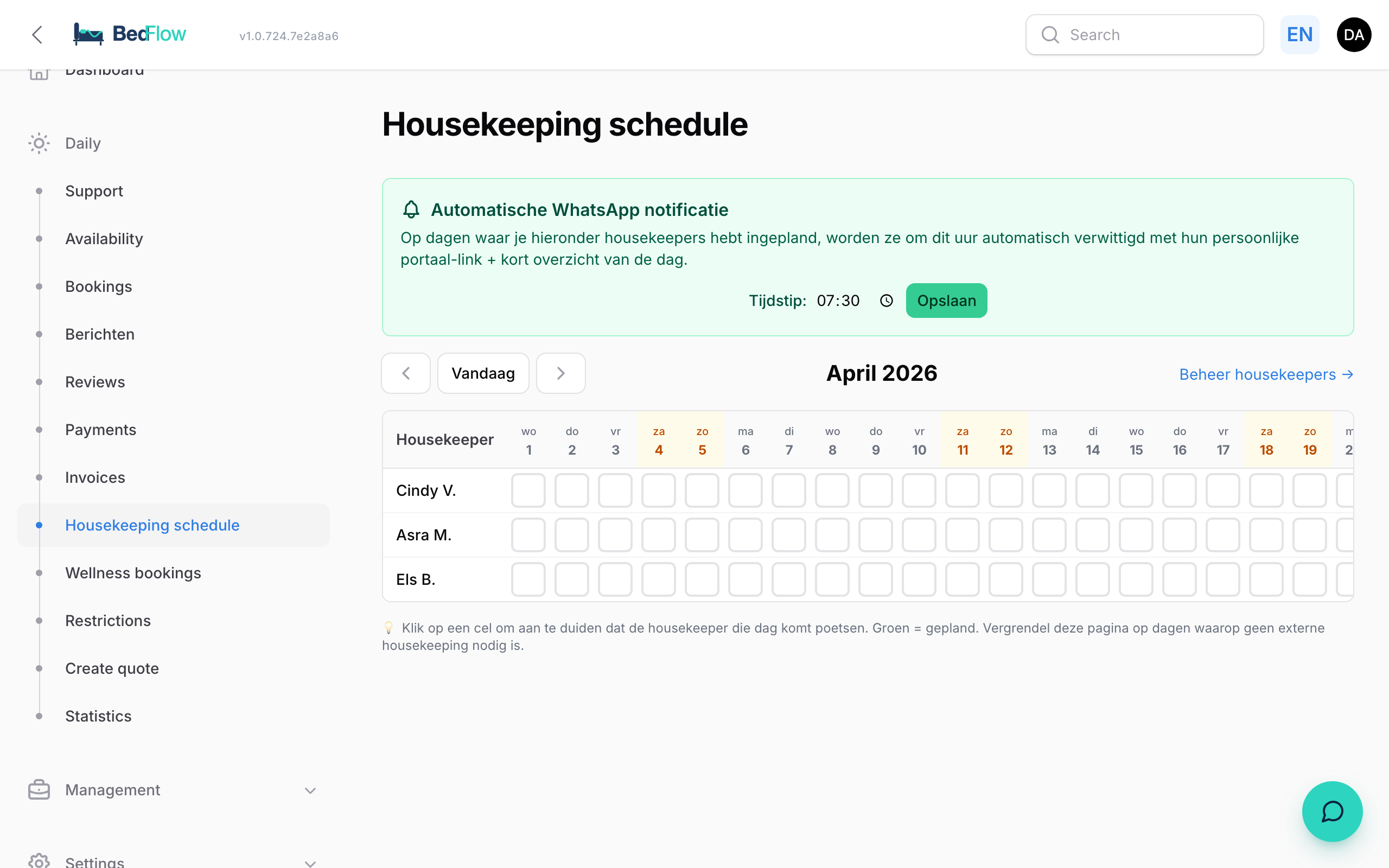
The rota
A table with a row for each active housekeeper and a column for each day of the month. Today is highlighted in red, weekends in amber. Use the arrows and Today to browse through the months. Manage housekeepers takes you to the list of your housekeepers.
Scheduling a working day
- Open Daily → Housekeeping schedule.
- In the housekeeper's row, click the cell under the right day.
- The cell turns green with a tick: the working day has been saved.
Clicking again removes the working day.
The automatic WhatsApp notification
At the top of the page is the Automatic WhatsApp notification block. Enter the time under Time and click Save. The default is 08:00. You set this time per property, and the overview only covers that property's rooms.
On every day a housekeeper is scheduled, they receive a short message at that time via your WhatsApp connection, with their personal link to the housekeeper portal. There they see what needs doing in each room and mark what's done.
- Everyone receives the message only once a day.
- If you schedule someone for today after the time has already passed, their message goes out within a minute.
- Nothing is sent to a housekeeper who is inactive or has no phone number, nor when there is no WhatsApp connection.
You change the text of that message under Management → Messages → Automated messages, in the Team messages block (Housekeeping daily overview and Housekeeping link).
Cleaning checklist and submitted checklists
Below the rota are the Cleaning checklist block (what your team fills in after each clean) and Submitted checklists (what they filled in this month). See Cleaning checklist.
Frequently asked questions
Did a notification actually arrive? Check in Management → Insights → Communication log, WhatsApp tab. The outgoing WhatsApp messages are listed there.
Can I put someone on holiday? Yes. In Settings → Housekeepers, switch off Active for that person. They are kept, but no longer appear in the schedule and their link doesn't work until you activate them again.
I don't see this page in the menu. Switch on the housekeeping module via Settings → Integrations → Guest experience → Housekeeping module. The page also requires the Starter plan or higher.
Related
- Activating the housekeeping module: switching on the module and adding housekeepers
- Housekeeper portal: what they see on their phone
- House-manager digest: a WhatsApp overview for your manager on site