Statistics — how to read the dashboard
Updated on 2026-09-30
Management → Insights → Statistics is the financial and operational dashboard of your property: revenue, invoices, occupancy, guest origin, channels and cancellations, each compared with last year. In a few minutes you can see how the season is going and where you can make adjustments.
Who sees this page?
- The statistics are part of the extended statistics, included from the Starter plan (also Pro, Business and Hotel).
- On Micro and Seizoen, Statistics does appear in the menu, with an Upgrade label. Click it to read what the plan above yours gives you.
- You always see the figures of the property selected at the top of the sidebar. If you manage several properties, switch property first.
Under Insights, besides Statistics, you will also find Weekdays (arrivals and departures by weekday) and the Communication log.
Choosing a year
At the top there is a button for each year in which there are invoices. Click a year and all figures and charts switch along with it. Every figure is compared with the year before.
When you look at the current year, BedFlow compares up to and including today: if it says "to 30/9", last year is also only counted up to 30 September. That way you never compare half a year with a full year.
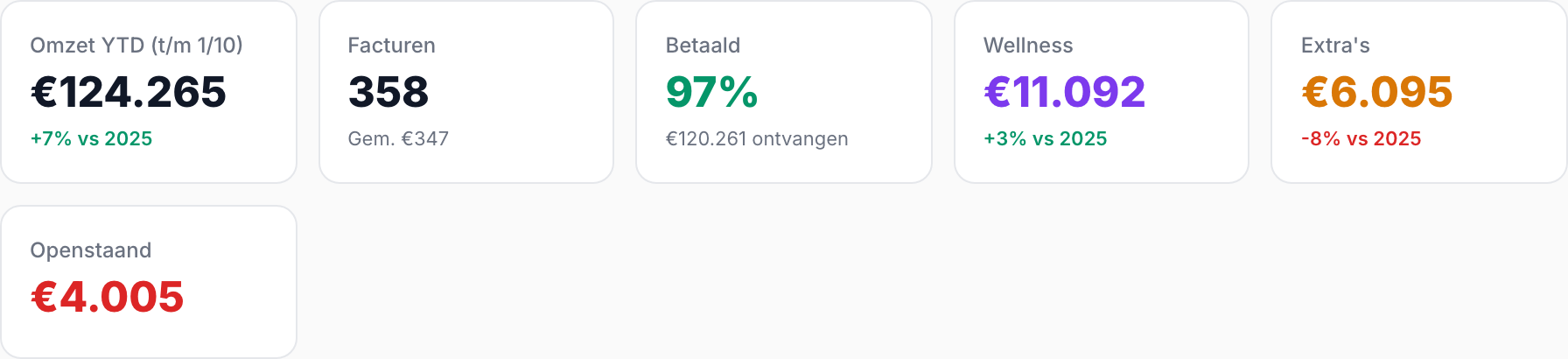
The key figures
| Figure | What it means |
|---|---|
| Revenue YTD | Your revenue from 1 January to today (or to the end of a closed year), with the percentage difference compared with the same period last year. |
| Invoices | The number of invoices in that year, with the average invoice amount below it. |
| Paid | Which share of your invoices has been paid in full, with the amount received. |
| Wellness | Revenue from wellness, with the difference compared with last year. Only appears if your property offers wellness. |
| Extras | Revenue from extras such as breakfast supplements, the honesty bar or a late check-out. |
| Outstanding | What has not yet been paid on that year's invoices. Red as long as anything is outstanding, green at zero. |
All amounts include VAT. BedFlow counts both the invoices it created itself and the invoices you imported from a previous system.
What else is on the page?
The rest of the page consists of blocks that each answer one question:
| Block | Answers | Explanation |
|---|---|---|
| Revenue per month, per room, monthly overview | How much do I earn, when and with which room? | Revenue per month and per room |
| Guest origin, revenue per channel | Where do my guests come from and through which channel? | Guest origin and channels |
| Cancellations, booking-to-stay lead time | How often are bookings cancelled and how far in advance do people book? | Cancellations and booking window |
| Full occupancy, wellness, top extras | When am I full and what do I sell on top? | Occupancy, wellness and extras |
At the top right there are two more buttons:
- Ad target — how many direct bookings an advertising campaign needs to bring in to be cheaper than commission. See Ad target.
- Statbel export — the monthly tourism statistics for Belgian properties. See Statbel export.
New rooms and renamed rooms
Room names and colours come straight from your rooms. If you add a room, it appears automatically in all charts. If you give a room a different name, its past revenue simply stays with that room.
Frequently asked questions
Why does the revenue differ from my accounts? Statistics counts invoices including VAT, by invoice date. Your accounts usually work excluding VAT and sometimes by payment date. For tax returns and year-end closing, your accounts remain the source.
I don't see a year among the year buttons. A year only appears once there is at least one invoice in that year.
The figures look too low for the current month. A stay only counts once it has been invoiced. What is still booked for the rest of the month appears as a dotted line in the "Revenue per month" chart — see Revenue per month and per room.