Subscription & billing
Updated on 2026-10-01
Video narrated in Dutch.
My subscription & invoices (at the top of the sidebar)
Everything about your BedFlow subscription itself: which plan suits you, what each plan includes, the free trial, where you manage your invoices and payment method, and how to switch plans or cancel.
Note: this article is about what you pay BedFlow. Invoices for your guests are created and managed elsewhere: see Invoicing & proformas.
Where do you manage your subscription?
At the top of the left sidebar you'll find My subscription & invoices. You can reach the same page via the user menu at the top right, or directly at /account/billing.
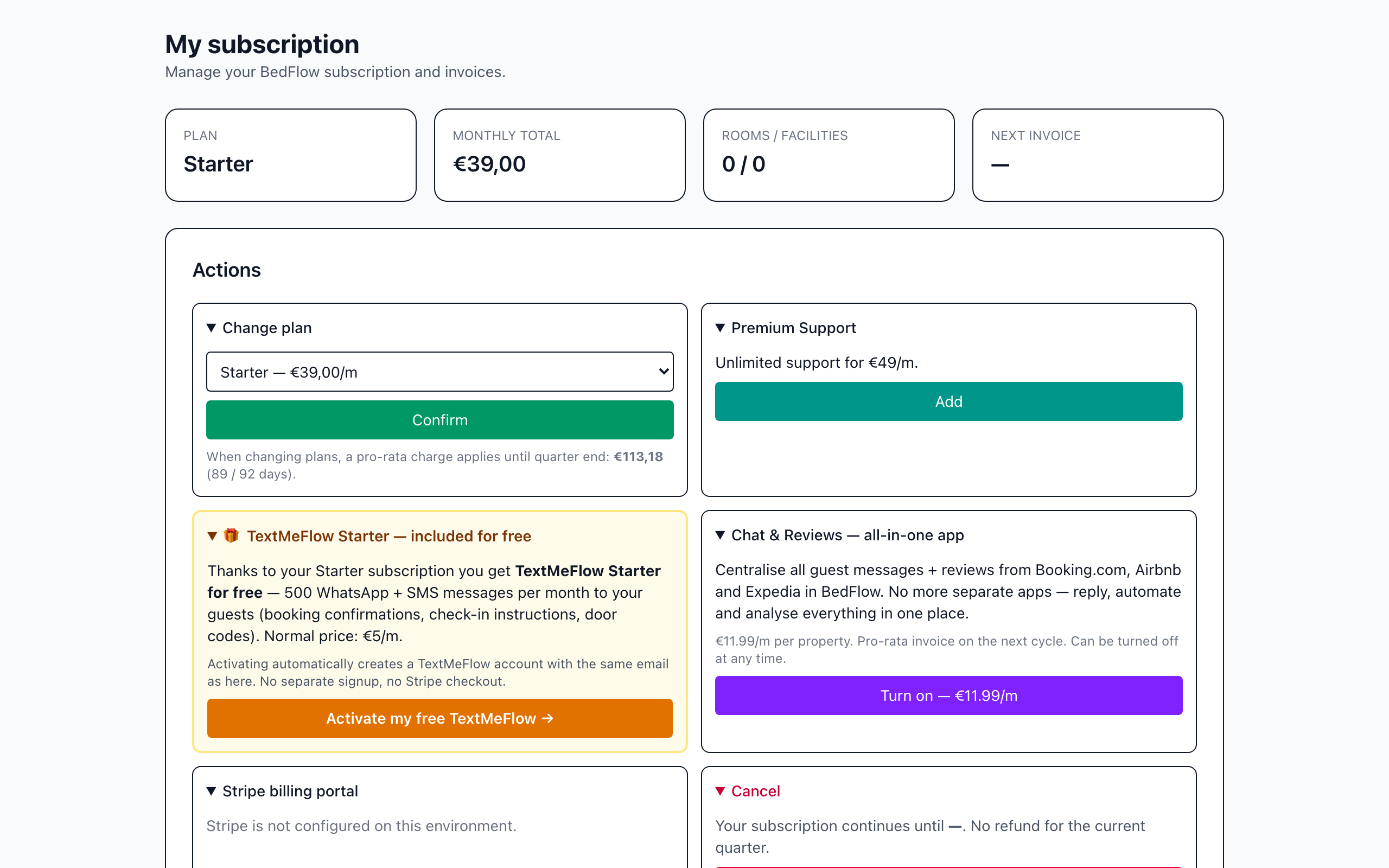
There you'll see:
- your current plan and its status (trial, active …);
- the total per month (or per year on Seizoen) and your Next invoice;
- the buttons to add a payment method, switch plans or cancel;
- your Company details (on invoice): company name, VAT number, address, email addresses;
- your BedFlow Invoices, each with a PDF.
The plans
| Plan | Price | Rooms | Facilities (e.g. wellness) |
|---|---|---|---|
| Seizoen | €79 per year | 1 holiday home | 0 |
| Micro | €19 per month | max. 2 | 0 |
| Starter | €39 per month | max. 4 | 1 |
| Pro | €79 per month | max. 10 | 2 |
| Business | €159 per month | max. 20 | 5 |
| Hotel | €249 per month | 30 included, expandable without limit | 5 included |
A few particulars:
- Seizoen is made for people who rent out a single holiday home. You pay €79 per year, which includes 25 bookings per year. Each booking above that costs €5 and is settled monthly. A maximum of one accommodation fits on this plan.
- Hotel has no hard limit: above 30 rooms you pay €4 per extra room per month, and €5 per extra facility per month.
- Monthly plans are invoiced per quarter, with no annual contract. Seizoen is invoiced per year.
- Support is included on every plan, Seizoen and Micro too: asking questions and reporting bugs is unlimited and free. Only when you ask us to do something on your behalf (set up rooms or rates, enter data, change a configuration) do we charge €9 per ticket as hands-on work. We always tell you in advance in the ticket. Larger jobs, such as training or a custom integration, are consultancy at €90 per hour. Switching to BedFlow (data migration) is free. See How our support works.
- The booking widget can be placed on your own website on every plan. Up to and including Starter, it shows "Booking engine by BedFlow" at the bottom; from Pro onwards it doesn't.
- Several locations in one account are possible from Pro. The number of rooms included in your plan applies to all locations together.
- Your plan follows your number of rooms. If you enter more rooms at sign-up than your chosen plan supports, your trial automatically starts on the smallest plan that does fit.
The current prices and the full comparison are always at bedflow.eu/pricing.
What is included in which plan?
The core is included in every plan: calendar, bookings, invoices and payments, your booking widget, automated emails and the connection with Booking.com, Airbnb and the other channels. From Starter, extra modules are added:
| Module | Where in BedFlow | Seizoen and Micro | Starter | Pro, Business, Hotel |
|---|---|---|---|---|
| Restrictions | Management → Rates → Restrictions | no | yes | yes |
| Quotes | Daily → Create quote | no | yes | yes |
| Extended statistics | Management → Insights | no | yes | yes |
| Communication log | Management → Insights → Communication log | no | yes | yes |
| Guest page | Management → Guest page | no | yes | yes |
| Guest inbox and reviews | Daily → Messages, Daily → Reviews | no | yes | yes |
| Housekeeping | Daily → Housekeeping schedule | no | yes | yes |
| Wellness | Daily → Bookings → Wellness bookings | no | yes | yes |
| Google Hotel Ads and Google Vacation Rentals | Settings → Integrations | no | yes | yes |
| WhatsApp via TextMeFlow Starter (free) | My subscription & invoices | no | yes | yes |
| Till (POS) | Daily → POS — Bar & Counter | no | no | yes |
| Booking widget without BedFlow credit | your own website | no | no | yes |
What does the "Upgrade" label mean?
If a module isn't included in your plan, it usually stays in the menu, with the label Upgrade next to it. Click it and you land on the page This module isn't included in your subscription. There you can read what the module does and from which plan it's available (the cheapest plan that includes it), with the buttons Change subscription and Compare all plans.
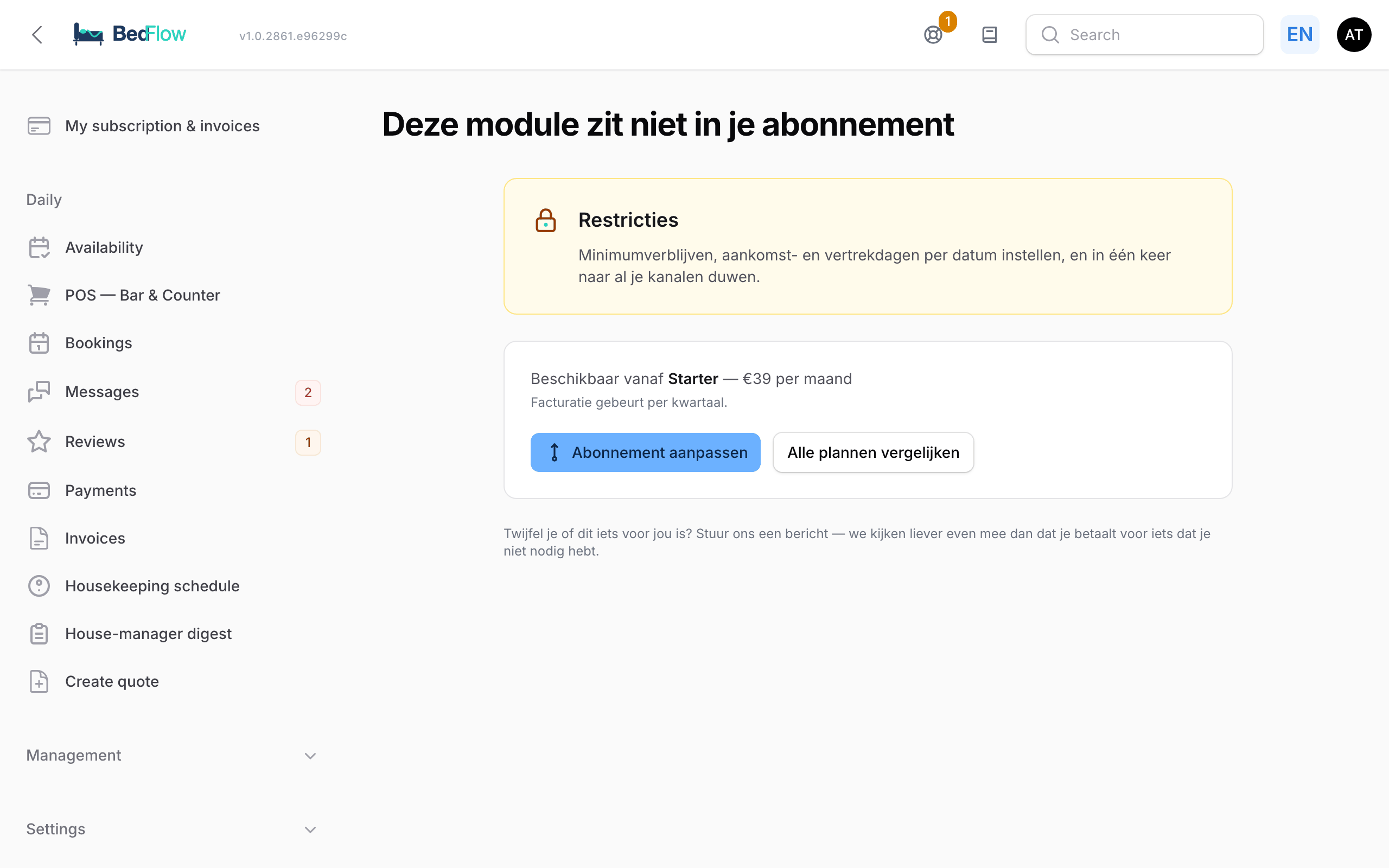
A few modules are hidden entirely by BedFlow if they aren't in your plan: housekeeping (Housekeeping schedule, House-manager digest, Settings → Housekeepers) and the Wellness bookings tab. The Google tile under Settings → Integrations stays visible but locked.
Try it free for 30 days
Every new account starts with a 30-day trial:
- Choose a plan on the pricing page and complete the sign-up.
- You don't enter a credit card. Your trial starts straight away.
- Seven days, three days and one day before the end you receive a reminder by email.
- Click Add a payment method and your subscription simply continues after the trial. Your first invoice is pro rata: you only pay for the days until the end of the current quarter.
Nothing is ever charged during the trial. There is no refund afterwards either: you try it free first, and you only pay if you continue after your trial.
What happens after your trial?
If you don't add a payment method, this is what happens:
| When | What happens? |
|---|---|
| End of the trial | You receive an email saying your trial has ended. You can keep working as normal for another 7 days. |
| 7 days after the end | Your account is frozen. When you log in, you land on the payment page. Your data is kept. |
| 14 days after the end | You receive a final warning: your data will be erased the next day. |
| 15 days after the end | Your account, your properties and all your data are permanently deleted. |
- If you add a payment method at any point, this stops immediately and you simply carry on working.
- This erasure only applies to trial accounts that never added a payment method.
- If you haven't used your trial account for a long time, you'll receive an email from us first. The freeze may then come sooner.
- Want to start later but keep your data? Email support@bedflow.eu before the erasure. We can then park your account until an agreed date. Your account stays frozen and you don't get a second trial: you start again by adding a payment method.
Payment method and BedFlow invoices
- Click Add a payment method: you go to a secure Stripe payment environment, where you add your card. If a card is already on file, you'll see Payment method active with a Change link.
- Via Open Stripe portal you can later change your card or download your invoices.
- Under Invoices you'll find all your BedFlow invoices, each with a PDF.
- Check your Company details (on invoice) and click Save company details. Changes apply from the next invoice. Be sure to fill in your VAT number: EU businesses with a valid VAT number receive an invoice with VAT reverse-charged.
Switching plans
- Open My subscription & invoices.
- Under Change plan, choose the new plan and click Confirm.
- Your new plan is active immediately. With an upgrade you pay the difference pro rata until the end of the quarter; the amount is shown below the drop-down list.
- During your trial, switching is free: no invoice is created.
- If a payment is still outstanding, you can switch plans once it has been settled or you've added a payment method.
- You can switch yourself between Micro, Starter, Pro, Business and Hotel. Want to move to or from Seizoen? Send a message to support@bedflow.eu and we'll arrange it.
- You can only downgrade to a plan that fits your number of rooms. With 8 rooms, you can't move to Starter (max. 4).
Extras on the same page
- TextMeFlow Starter, included free (from Starter): our WhatsApp and SMS service, activated with one click via Activate my free TextMeFlow. See WhatsApp via TextMeFlow.
- Chat & Reviews (€11.99 per month per property): messages and reviews from Booking.com, Airbnb and Expedia directly in BedFlow. You switch the add-on on with Turn on, or by switching on OTA guest messages under Settings → Integrations → Communication. The first month is charged pro rata on your next invoice; you can switch it off at any time.
Cancelling
At the bottom of the page, click Cancel and confirm. Your subscription continues until the end of the period you've already paid for (the current quarter, or the current year on Seizoen) and then stops automatically. A current period is not refunded.
Frequently asked questions
Do I need to enter a credit card to try it? No. The 30-day trial starts without payment details.
What happens if I get more than 25 bookings on Seizoen? Each booking above 25 costs €5 and is settled monthly. If that becomes structural, Micro or Starter is often better value; we credit the annual amount you've already paid pro rata.
I have a VAT number. Do I pay VAT on my BedFlow invoice? EU businesses with a valid VAT number receive an invoice with VAT reverse-charged. So fill in your VAT number in your company details.
Is this the same place as the invoices for my guests? No. You manage guest invoices under Daily → Invoices. See Invoicing & proformas.
Can I change my billing frequency? Monthly plans are invoiced per quarter and Seizoen per year. A different frequency isn't possible.
Related
- Getting started: the step-by-step plan
- My property — your property settings
- How our support works — support included on every plan
- WhatsApp via TextMeFlow