Deposit — what does a guest pay when booking?
Updated on 2026-10-01
Settings → Deposit
How much a guest pays straight away when booking is something you set yourself on this page (titled What does a guest pay when booking?). Whatever you choose here is used by your booking engine, the payment page and the confirmation email.
Be sure to check this page at least once. The default values may not be what you promise on your own website.
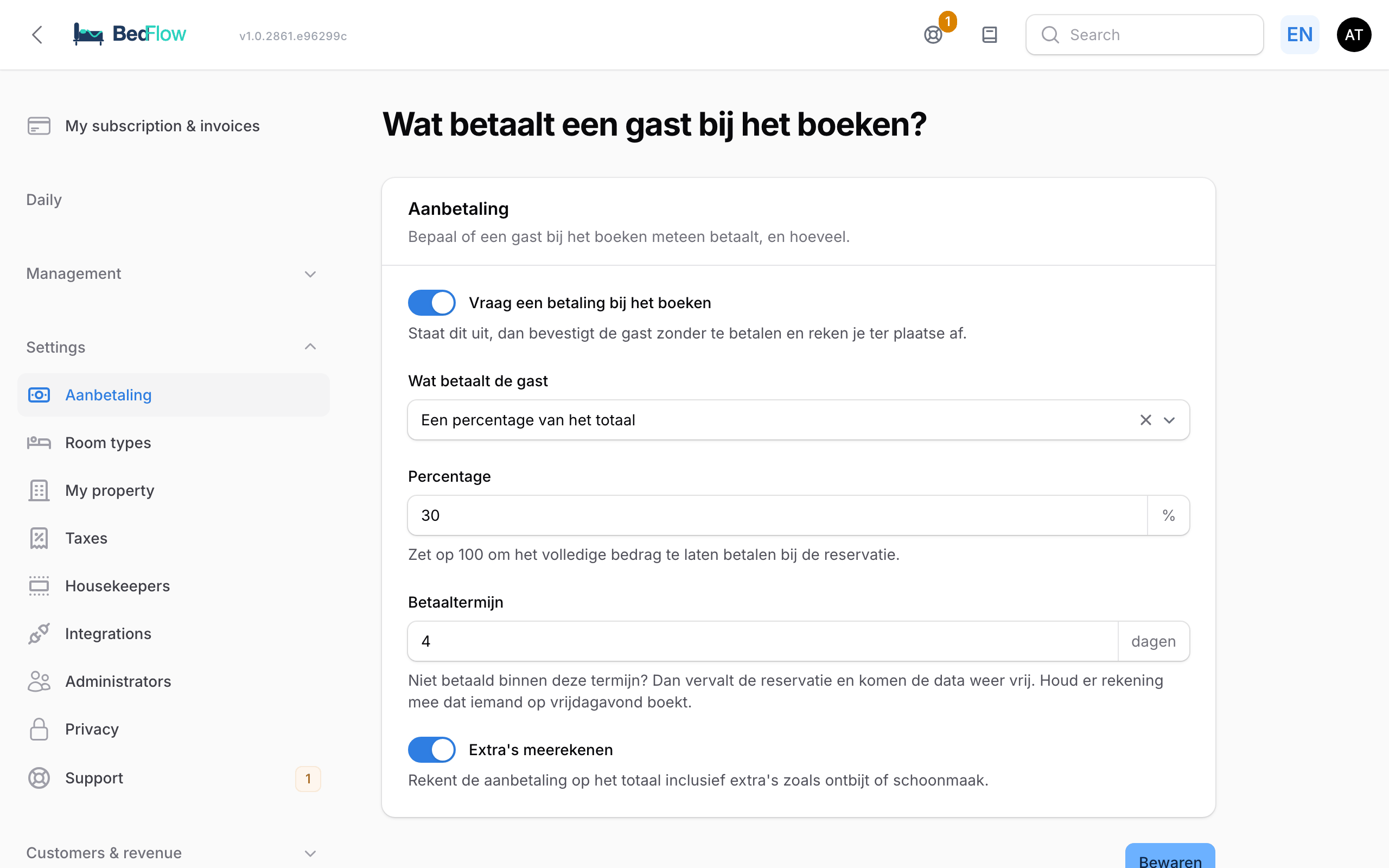
The settings
Ask for a payment when booking: the main switch. When it is off, the guest confirms without paying and you settle up on site.
When it is on, you choose under What does the guest pay:
| Choice | What the guest pays |
|---|---|
| A percentage of the total | Enter the Percentage, e.g. 30. Set it to 100 to have the full amount paid at the time of booking; many holiday homes do this |
| A fixed amount | Enter the Fixed amount, e.g. €50 per booking, regardless of the total price. If the booking costs less, the guest pays the total |
| The first night | The price of the first night. The booking engine shows that amount; for now, the proforma and the payment page calculate with the Fixed amount |
Payment term (in days): not paid within this term? Then the reservation expires and the dates become available again. Think of guests who book on a Friday evening: a term of 1 day is tight over a weekend.
Include extras: this checkbox is on the page, but at the moment the deposit is always calculated on the total including extras.
Click Save.
Whatever the guest doesn't pay when booking remains outstanding until their arrival. You can see it for each booking.
Where does this apply?
- Booking engine: when booking, the guest sees the deposit and the payment term.
- Payment page: the guest chooses between the deposit and the full amount.
- Confirmation email: the email states the amount and the term.
This concerns bookings via your own website and payment requests that BedFlow sends. What a guest pays through a channel (Booking.com, Airbnb, …) is determined by that channel itself.
When is there no deposit?
- Non-refundable rate = paid in full upfront. If the guest chose a non-refundable rate option on your own booking site, they always pay the full amount, regardless of the percentage above. This is stated next to the option in the booking engine, on the proforma, in the confirmation email and in the payment reminder. The payment page then offers no choice.
- Only with a room. A deposit is only possible if the booking includes a room. If someone books only a wellness session or separate extras, or buys a gift voucher, they pay the full amount.
- Already paid something or checked in. The payment page then no longer offers a choice and asks for the outstanding balance.
Frequently asked questions
I want guests to pay everything upfront. Is that possible? Yes: choose A percentage of the total and set it to 100.
I don't want to ask for any online payment at all. Turn off the main switch. The guest then confirms without paying and you settle up on site.
Does this apply per property? Yes. Everything on this page is saved per property. If you have several properties, first choose the right property at the top of the sidebar.
What if the guest doesn't pay in time? The reservation expires after the payment term and the dates automatically become available again for other guests.
Can I give a different term for a booking made by phone? Yes, with a manual booking you decide yourself whether payment is required and within what term. See Manual booking.