Managing products & extras
Updated on 2026-10-01
Management → Products
This is where you manage all the extras a guest can add to their booking or that you put on an invoice yourself: breakfast, a bottle of cava, a wellness session, an extra bed, the final cleaning, the drinks from your honesty bar.
Adding a new product
- Open Management → Products and click New product.
- Fill in the sections (see the table below). At least a Name, a Category and a Price incl. VAT.
- Under Applies to these units/rooms, tick the units the product belongs to.
- Click Create.
The fields
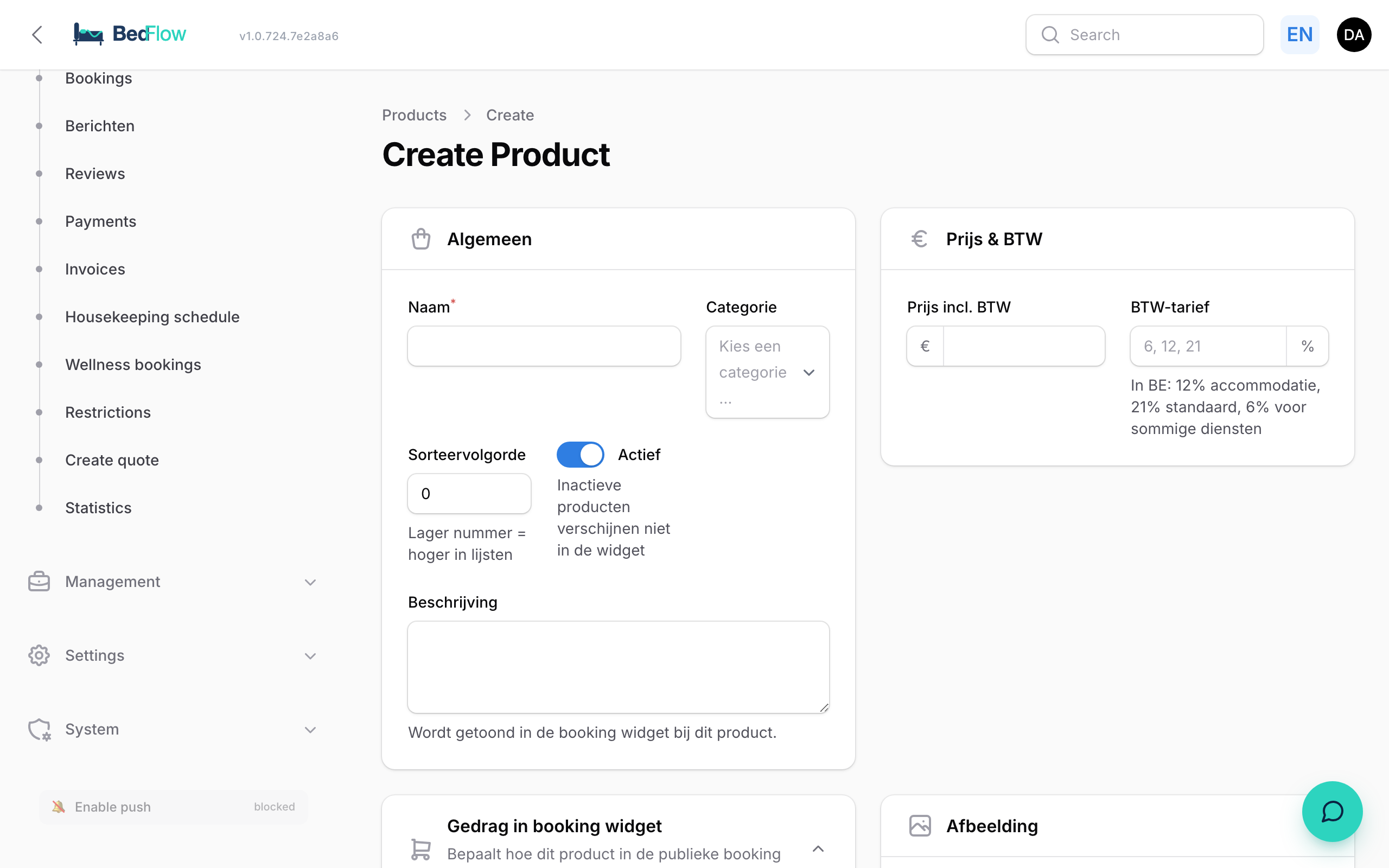
| Section | Field | What it does |
|---|---|---|
| General | Name | As the guest sees it, e.g. "Wellness session 2.5 hours" |
| Category | Surcharge, Wellness, Food & Beverage, Honesty bar or Extra (see below) | |
| Sort order | Lower number = higher in the lists | |
| Active | Inactive products do not appear in the widget | |
| Description | Shown with the product in the booking widget | |
| Price & VAT | Price incl. VAT | What the guest pays |
| Discount with overnight stay | Amount deducted when the guest books the product together with a room (see below) | |
| VAT rate | The VAT percentage of this product, e.g. 6, 12 or 21 | |
| Booking widget behaviour | Bookable via widget | Shown as an extra with online bookings |
| Mandatory on every booking | Charged automatically; the guest cannot leave it out. See Mandatory fees | |
| Guest chooses quantity | The guest chooses a quantity themselves (1 to 20); otherwise a fixed 1 item | |
| Price per person | Price × number of guests | |
| Price per night | Price × number of nights | |
| Applies to these units/rooms | Units/rooms | Which units the product belongs to. Not ticked = not shown and not charged there |
| Image | Product photo | Appears in the POS, with the honesty bar on the guest page and on the Bar QR menu |
| Accounting | GL account, Cost centre | For the export to your accounting software. The heading shows the name of your connected package, e.g. "Accounting (Yuki)" |
Worked example: Cheese board in the room at €18, bookable, Guest chooses quantity and Price per person on, Price per night off. A party of 3 chooses 2: 2 × 3 × €18 = €108.
Categories
| Category | Examples | Special feature |
|---|---|---|
| Surcharge | extra person, extra bed, pet, late check-out | With Price per person, BedFlow only counts the people above 2, per room |
| Wellness | wellness session, extra hour, bathrobe | Guests can reserve a wellness session. See Wellness bookings |
| Food & Beverage | breakfast supplement, bottle of wine, tapas | Also available in the POS |
| Honesty bar | drinks and snacks from the minibar or fridge | The guest taps them in themselves on their guest page; also in the POS and on the Bar QR menu |
| Extra | anything that doesn't fit anywhere else |
Surcharge per extra person
A product in the Surcharge category with Price per person only charges the people above 2, and that per room. Children count. So a group with three rooms of 2, 3 and 2 people pays for 1 extra person, not for 5. In the other categories, every guest counts.
Discount with overnight stay
In the Price & VAT section, you enter a Discount with overnight stay per product. That amount is deducted from the price when the guest books the product together with a room: in the quote, with a booking and on your website. For example €20 off a wellness session of €199: with an overnight stay the guest pays €179, without an overnight stay €199.
- Empty or 0 means no discount. Each product has its own amount: a bathrobe or an extra person only gets a discount if you add one yourself.
- The discount never goes below zero.
- A price you type in yourself in a quote is left untouched.
Which units is a product linked to?
A product appears in the widget and is charged for the units you tick. You can do this in two places, which show the same link:
- on the product itself: section Applies to these units/rooms;
- on the unit: Settings → Room types → edit the room type → Services & policies tab → section Bookable extras in widget. Only active products that are Bookable via widget or Mandatory on every booking are listed there.
That way you can, for example, offer the linen package only with the big house, and the extra-person surcharge only with rooms that have space for a third person. Does the price differ per unit (e.g. final cleaning for a studio versus a villa)? Then create a separate product per price and link each one to the right units.
The list
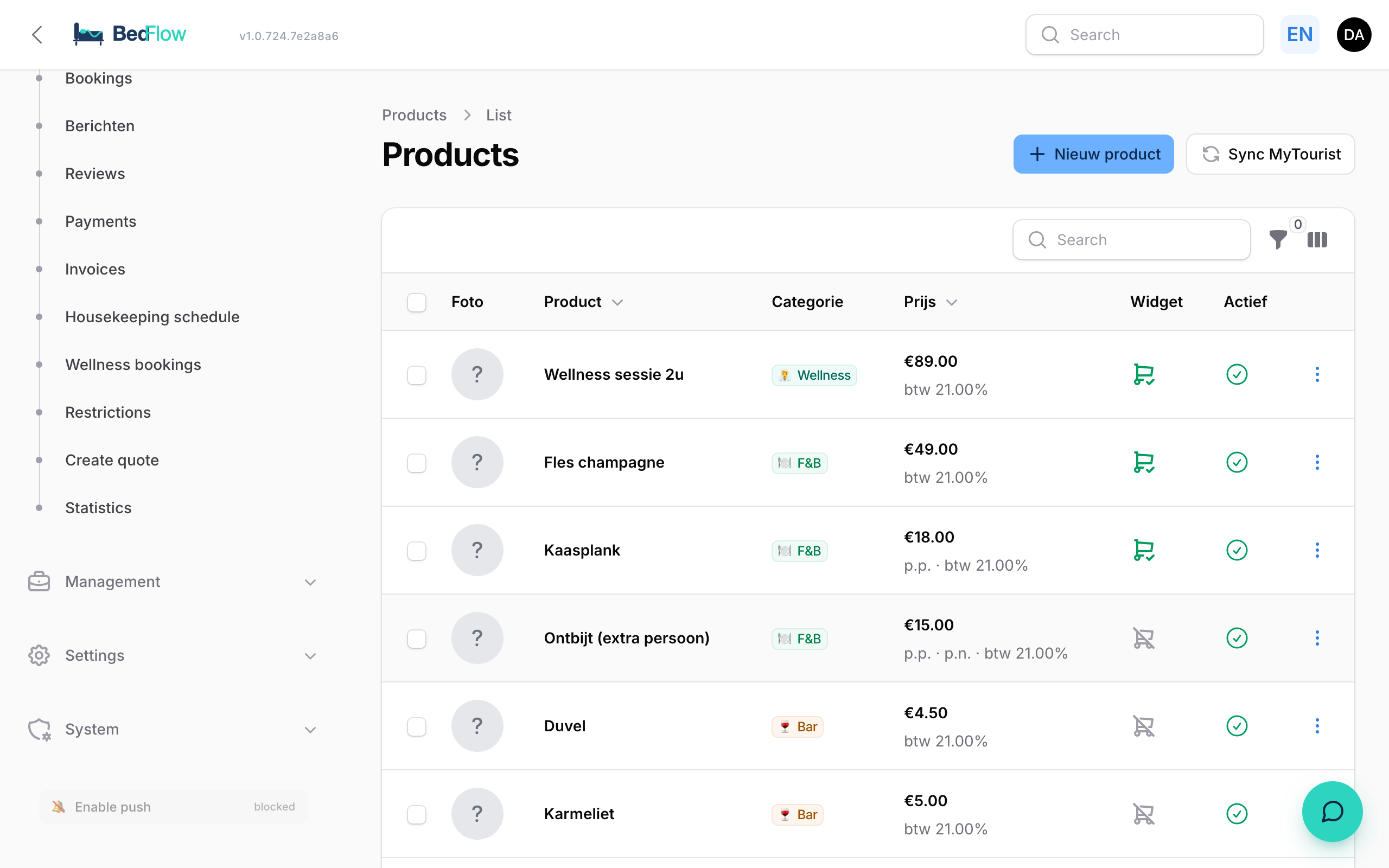
For each product, the list shows the photo, the name, the category, the price, whether it is in the widget (Widget) and whether it is Active. You can filter on Category, Active and Bookable.
Via the menu at the end of a row you can view, edit, Duplicate or delete a product.
Duplicating
Handy for variants. Create "Standard breakfast", choose Duplicate on that product, name the copy "Vegetarian breakfast" and adjust the price.
Honesty bar
Products in the Honesty bar category appear on the guest page during the stay. The guest taps what they took and every tap becomes a line on their invoice; you see it straight away. To ring up consumption at the bar or the counter yourself, use the POS. Do you want guests to scan a drink and pay straight away? See Bar QR.
Frequently asked questions
My product is not in the widget. Why? Check three things: Active is on, Bookable via widget is on, and the product is linked to the unit the guest is booking.
Which VAT rate should I choose? That depends on the product and the country. If in doubt, ask your accountant. The rate on the product is used everywhere: in the widget, on the invoice and in the POS.
Can I hide a product temporarily without deleting it? Yes, switch off Active.