POS — charging bar & consumption
Updated on 2026-10-01
Daily → POS — Bar & Counter
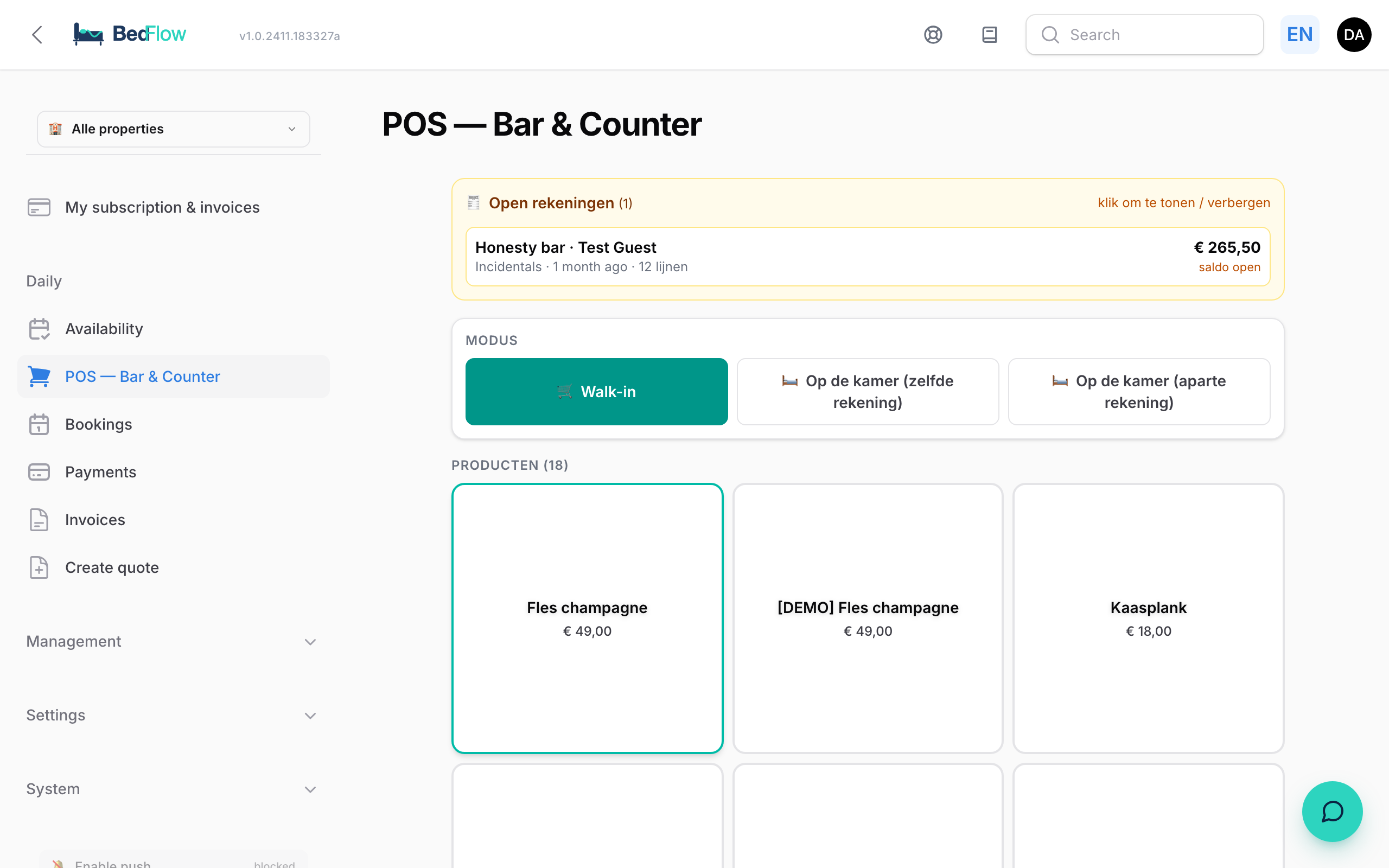
The BedFlow POS works on your phone. Tap a product and it goes straight onto the right tab: a passer-by's, or that of a guest who is staying with you.
When do you see the POS?
- The POS is included in the Pro plan and higher. On a smaller plan, the menu item is shown with an Upgrade badge.
- It only appears for a property with a bar, honesty bar or display counter. Holiday homes don't see the menu item by default. Does your holiday home have a minibar after all? Ask support to switch on the POS.
Three modes
At the top, under Mode, you choose:
| Mode | When |
|---|---|
| Walk-in | A passer-by who pays straight away |
| On the room (same tab) | The consumption goes onto the booking's main tab, and therefore onto the same invoice as the stay |
| On the room (separate tab) | In the POS, the consumption is kept on a separate tab of the booking, alongside the main tab |
Which products are in the POS?
All active products from the Honesty bar, Food & Beverage and Wellness categories, grouped by category and sorted by sort order. A product photo appears as the background of the tile. You manage them via Management → Products, see Managing products & extras.
Charging consumption to an ongoing booking
- Open Daily → POS — Bar & Counter.
- Choose On the room (same tab) or On the room (separate tab).
- Choose the guest under Choose booking (in-house). You only see guests whose stay is ongoing today and who have not yet checked out.
- Tap the products. Each tap adds 1 item.
- At the bottom, click Booked on the room — settle at check-out. The tab stays open until check-out.
Each line goes straight onto the booking's proforma. So the outstanding balance in the room overview and in the invoice list is always correct, even before check-out.
Settling up with a passer-by (walk-in)
- Choose the Walk-in mode and tap the products.
- Optional: fill in In the name of and click Set. Type a name, or a VAT number (e.g.
BE0123456789): BedFlow then looks up the company in the European VAT database (VIES) and puts the correct company details on the invoice. Empty = regular POS sale. With detach you remove the name again. - Choose how the customer pays:
| Button | What happens |
|---|---|
| Bancontact (QR) | A QR code appears that the customer scans with their banking app. The payment is linked to the invoice automatically |
| BC already paid | The customer has already paid via your QR sticker or payment terminal |
| Stripe, Cash, Other | The payment is recorded with that method |
| Proforma (pay later) | A proforma is created that stays unpaid in Daily → Invoices until you record the payment there (e.g. for a bank transfer) |
After settling up, the invoice is created and the POS is ready for the next customer.
Removing an incorrect line
Tapped the wrong product or tapped twice? Remove the line in the POS itself:
- Open the tab. The active tab is at the top; you'll find an earlier one under Open tabs (click it to continue with it).
- Click the cross next to the line and confirm.
The line then also disappears from the booking's proforma, and the amount paid and the outstanding balance stay correct. So always remove bar lines via the POS (or via the honesty bar on the booking), not directly on the invoice. That way the tab and the invoice stay in line.
Managing open tabs
- Open tabs at the top shows all tabs that are still open, with their total and whether there is still a balance outstanding. Click a tab to continue working with it.
- The arrow button next to the total of the active tab leaves that tab open and starts a new customer.
- The bin button next to the total deletes the whole tab: all lines and payments, without an invoice. This cannot be undone.
- Closed tabs can no longer be changed.
At check-out
Open room tabs are settled at check-out: the lines are already on the booking's proforma and the tab is closed. The guest thus receives one complete final invoice with both the stay and the consumption.
Frequently asked questions
I don't see the POS in the menu. Either your property is a holiday home without a bar: ask support to switch on the POS. Or an administrator has restricted your permissions: ask the account owner.
There are no products in the POS. Give your products the category Honesty bar, Food & Beverage or Wellness and set them to Active.
Can the guest record consumption themselves? Yes. The guest taps products from the Honesty bar category themselves on their guest page during their stay. Each tap goes onto the same proforma and you see it straight away. With Bar QR, a guest can also scan and pay for a drink without the guest page.
Can I invoice a walk-in to a company? Yes. Type the VAT number in the In the name of field. BedFlow fetches the company name and address via VIES.
Which VAT rate is used? The rate set on the product itself (Management → Products).