Integrations — overview
Updated on 2026-10-01
Settings → Integrations
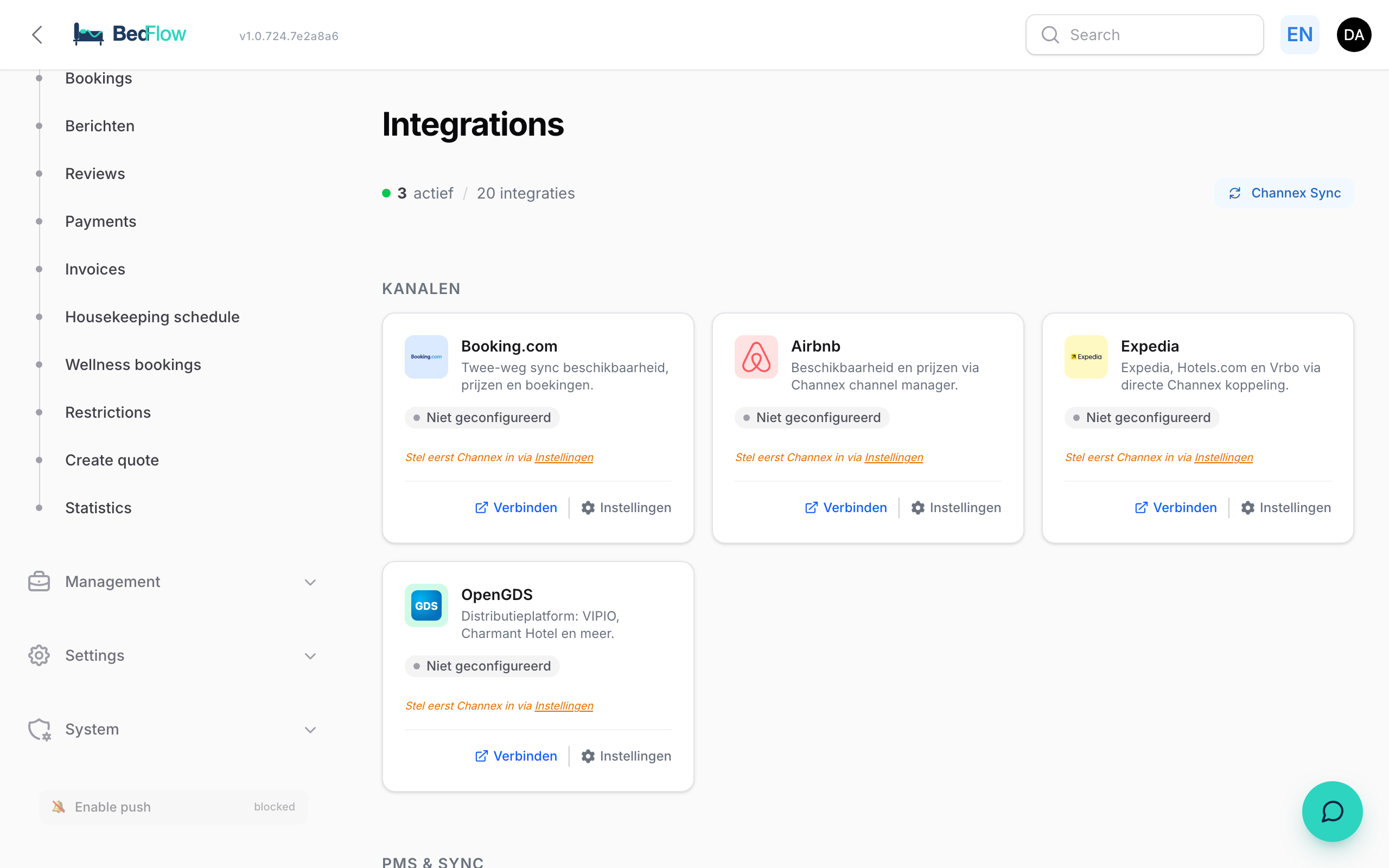
On this page you connect BedFlow to everything outside it: your booking channels, your payment provider, WhatsApp and Telegram, your accounting package, your smart locks and the modules for your guests. Each integration is a tile with a status, so you can see at a glance what works and what still needs attention.
Everything that is an integration is set up here. Settings → My property holds the details of your property itself (address, house style, check-in times, wifi, …).
Who sees this page?
You see Integrations if you have write access to the Settings & integrations module. A team member with read-only access or without that module doesn't see the menu item. You grant permissions under Settings → Administrators (see Extra users and permissions).
Integrations apply per property. If you have several properties, first choose the right property in the property switcher at the top of the sidebar.
The page at a glance
| Item | What you see |
|---|---|
| Counter at the top left | How many integrations are active, e.g. "7 active / 31 integrations". |
| Test connection | Checks the connection with the channel manager (see below). |
| Synchronise channels | Sends your availability and prices to all your channels again (see below). |
| Filter bar | The options All · Active · Setup incomplete · Inactive · Not configured, followed by the names of the categories. The bar stays at the top as you scroll. |
| Categories | For each category a short explanation, a counter ("2 / 5 active") and the tiles. |
Click a filter to see only the tiles with that status. Active shows both the tiles with the status Active and those with Connected. Click a category name in the bar to jump straight to it.
The categories and their tiles
The categories are always shown in this order.
Channels
Booking.com, Airbnb, Expedia, Vrbo, Google, OpenGDS, HRS, Check24 and Weekendesk. BedFlow sends your availability and prices to those channels via the channel manager Channex, and brings in their bookings — explained in Connecting channels via Channex.
- Google: you see either Google Hotel Ads (B&B or hotel) or Google Vacation Rentals (holiday home), never both. This depends on the property type under Settings → My property → General → Type. On the Seizoen and Micro plans, the Google tile shows Not in your plan, with an Upgrade button. See Google Hotel Ads and Vacation Rentals.
- Add channel: at the top of the category. BedFlow reaches 130 booking channels; any channel without a standard tile (e.g. Hotelbeds or Trip.com) can be added this way. See Adding a channel.
- Channels without a connection to the channel manager (Bedandbreakfast.eu, Gîtes de France, …) you follow with iCal feeds.
Payments
| Tile | What it's for | Explanation |
|---|---|---|
| Stripe | Card payments, Apple Pay, Google Pay | Setting up Stripe |
| Mollie | Card, Bancontact, iDEAL, SEPA through one provider | Setting up Mollie |
| Bancontact / WERO | Belgian debit cards via Bancontact Pro | Setting up Mollie |
| Bank transfer | Show your account number and reference when there is no online payment method | Payment by bank transfer |
| Deposits | Ask for a deposit when booking | You set this up on Settings → Deposit, see Deposit |
Communication
| Tile | What it's for | Explanation |
|---|---|---|
| Messages to your guests from your own number | WhatsApp via TextMeFlow | |
| Telegram | Notifications for yourself: bookings, payments, check-in requests | Setting up Telegram |
| OTA guest messages | The Booking.com and Airbnb chat in your guest inbox. A paid add-on of €11.99 per month as long as the toggle is on. | Guest inbox |
Accounting
Yuki, Peppol (via Yuki), Billit, Octopus and ClearFacts. Your final invoices go automatically to your accounting package or to your accountant. Explained in Connecting your accounting and ClearFacts.
If your property is in Portugal, you'll also find InvoiceXpress here for the mandatory certified invoicing — see InvoiceXpress (Portugal).
PMS & Sync
MyTourist. This tile is only relevant if you are switching from MyTourist to BedFlow. The ongoing synchronisation with MyTourist no longer exists; you switch over once, see Migrating from MyTourist.
Smart Home & Home automation
| Tile | What it's for | Explanation |
|---|---|---|
| Home Assistant (Bold) | Opening Bold door locks via your own Home Assistant | Smart locks |
| Salto KS | Keypad locks with a personal PIN code per stay | Smart locks |
| TTLock | Keypad locks with a personal PIN code per stay | Smart locks |
| Google Calendar | Wellness bookings in your own Google calendar | Wellness bookings |
| Breakfast API | Today's and tomorrow's breakfast times on a screen or tablet in your kitchen | — |
Guest experience
| Tile | What it's for | Explanation |
|---|---|---|
| Booking Widget | Your booking engine: embed code, minimum and maximum stay, closing time, how far ahead | The booking widget |
| Gift vouchers | Selling gift vouchers on your own site | Gift vouchers |
| Bar QR | QR cards on the fridge: pay for a drink with Bancontact or charge it to the room | — |
| Google Analytics (tracking) | Reporting paid bookings to your own Google Analytics | Conversion tracking |
| Wellness | Online wellness bookings | Wellness bookings |
| Relaxy | Requests from relaxy.be become wellness reservations with a payment link | Relaxy |
| Housekeeping module | Schedule and portal for your cleaning staff | Activating housekeeping |
| Guest registration | The legal accommodation register, filled in by your guests | Guest registration |
| SIBA | Portugal only: the Boletins de Alojamento | SIBA |
Relaxy is part of the wellness module. If that isn't included in your plan, the tile shows Not in your plan with an Upgrade button.
Coming soon: Pricing
The connection with PriceLabs (dynamic daily prices) has been requested. As soon as PriceLabs releases it, the Pricing category appears here. Until then you won't see this category. See PriceLabs.
What does the status on a tile mean?
| Status | Meaning |
|---|---|
| Connected | The integration is set up and working. For a channel: the channel is switched on and at least one room is linked. |
| Active | The feature is switched on. |
| Setup incomplete | The integration is switched on, but something is missing. A yellow line below the status says what, e.g. "Toggle is on, but the Secret key is missing. Guests can't pay with this yet." |
| Inactive | Set up, but switched off. For a channel: switched off, or no room linked yet. |
| Not configured | Not set up yet. |
| Requested | BedFlow is waiting for the partner (e.g. PriceLabs). You can't use it yet. |
| Not in your plan | Not included in your current plan. Upgrade shows which plan does include it. |
Setting up a tile
- Channel tiles have a toggle at the bottom (channel on or off), a Guide button and a Settings button. Guide opens the article about that channel, or that channel's page on bedflow.eu with a step-by-step plan. Settings opens the ‹channel› configuration window with the connection, the commission and the room mapping.
- Other tiles have a Configure button. A window slides open with the fields for that integration; you save with Save.
- The Housekeeping module also has a toggle on the tile. Every toggle and every status applies to the property selected at the top; if you have several, you set them up for each one separately. You switch online booking on or off at your property, see The booking widget.
- InvoiceXpress opens its own step-by-step page instead of a window.
Your keys, tokens and passwords are stored encrypted. In the window you see them masked; the eye icon reveals them.
Test connection and Synchronise channels
At the top right are two buttons for your booking channels.
- Test connection immediately checks whether the connection with the channel manager works and shows how many room types and rate plans are found for your property. If your property isn't on the channel manager yet, you get the message Channel manager not yet connected: in that case, first request a channel via a channel tile. BedFlow then adds your property to it itself.
- Synchronise channels sends your availability and prices for the next 365 days to all your connected channels again. You follow the progress in a bar at the top of the page. Handy after big changes, such as new seasonal prices. If rooms or base prices are still missing, BedFlow reports Finish the basics first and nothing is started.
If something doesn't come through properly, first test the connection and then synchronise. More details in Connecting channels via Channex.
Missing an integration?
The full list of more than 150 integrations is in All integrations. Is your channel, payment method or accounting package not listed? Email support@bedflow.eu. We build every interesting integration.